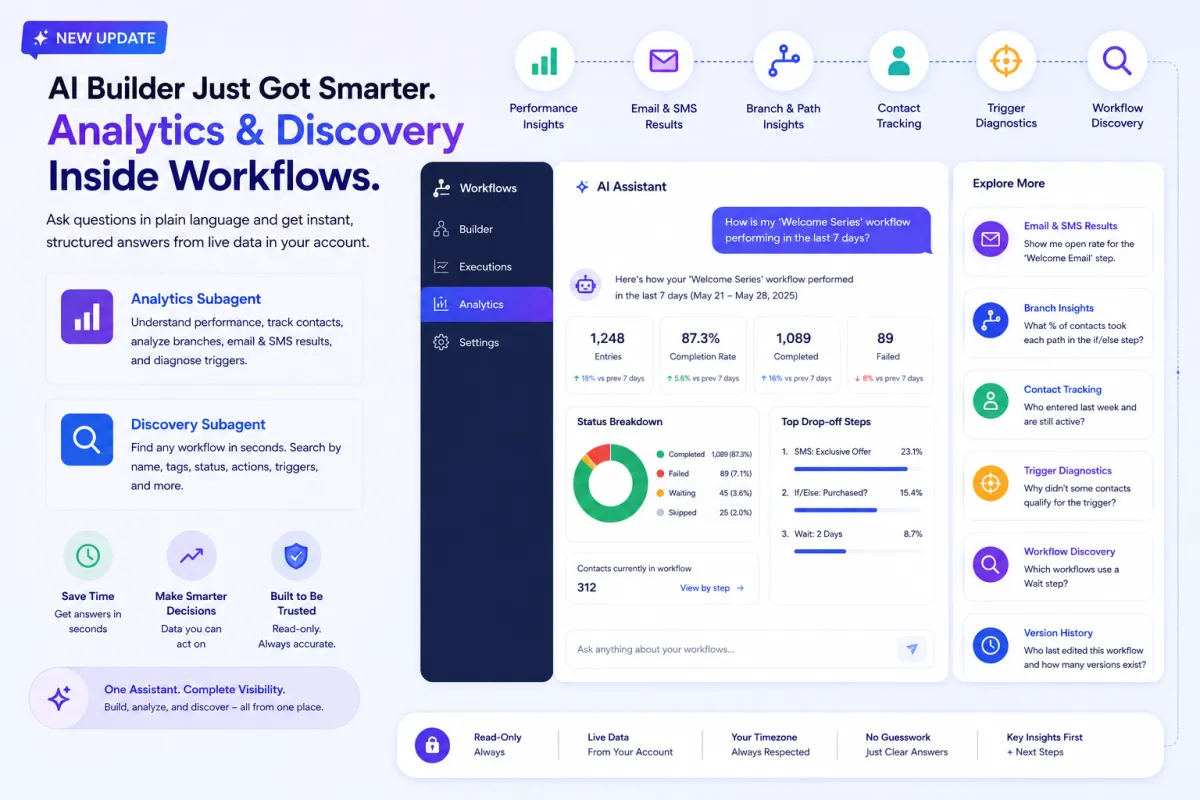
AI Builder Analytics & Discovery: Smarter Workflow Insights and Performance Tracking
Workflows are at the heart of automation. They power lead nurturing, customer engagement, and operational efficiency. But building workflows is only half the job. The real value comes from understanding how they perform.
Until now, analyzing workflows required navigating multiple dashboards, reviewing logs, and manually piecing together insights. This process was time-consuming and often limited visibility.
That changes with the introduction of the Analytics and Discovery Subagent in AI Builder.
AI Builder can now go beyond building and editing workflows. It can analyze performance, answer questions in plain language, and help you discover workflows instantly — all from a single interface.
What’s New in AI Builder
This update transforms AI Builder into an intelligent assistant that combines creation, analysis, and discovery in one place.
You can now:
Ask performance-related questions and get structured answers
Analyze workflow trends using live data
Track individual contacts through workflows
Identify bottlenecks and drop-offs
Search workflows instantly without navigating manually
All of this happens directly within the workflow environment, without needing any additional setup.
Performance Insights: Understand Workflow Health Instantly
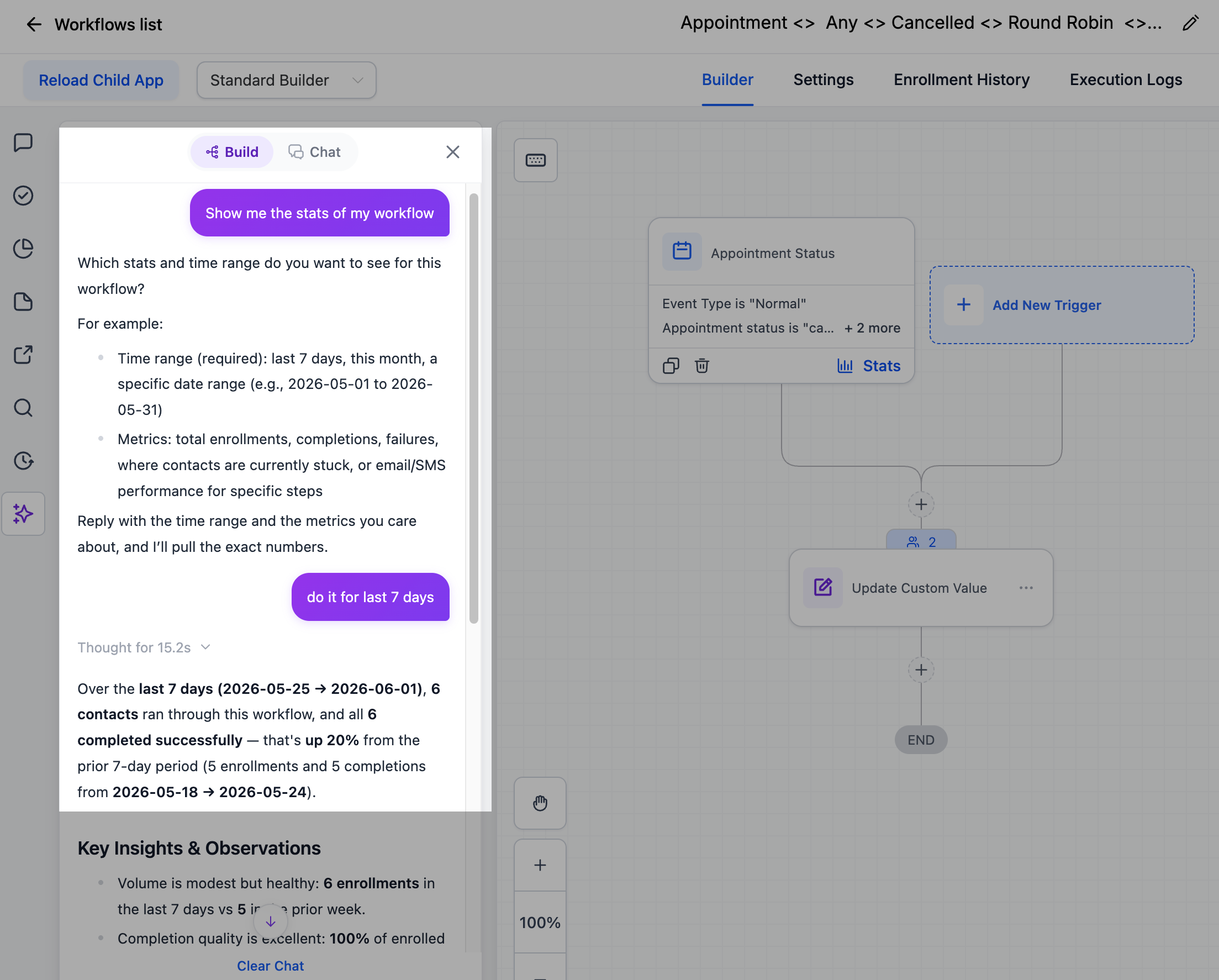
One of the most powerful additions is the ability to analyze workflow performance using natural language.
Instead of digging through logs, you can simply ask:
“How is this workflow performing?”
“What happened in the last 7 days?”
The AI will respond with structured insights based on live data.
What You Can See
The system provides:
Total entries over a selected time period
Comparison with the previous period (up or down trends)
Status breakdown (completed, failed, waiting, skipped)
Completion rate
Goal conversions
Drop-off points
Trend Analysis
You can also view performance trends:
Weekly
Daily
Hourly
Additionally, you can see how many contacts are currently sitting at each step in the workflow.
This level of visibility helps you quickly identify what’s working and what needs improvement.
Email and SMS Results: Deep Engagement Insights
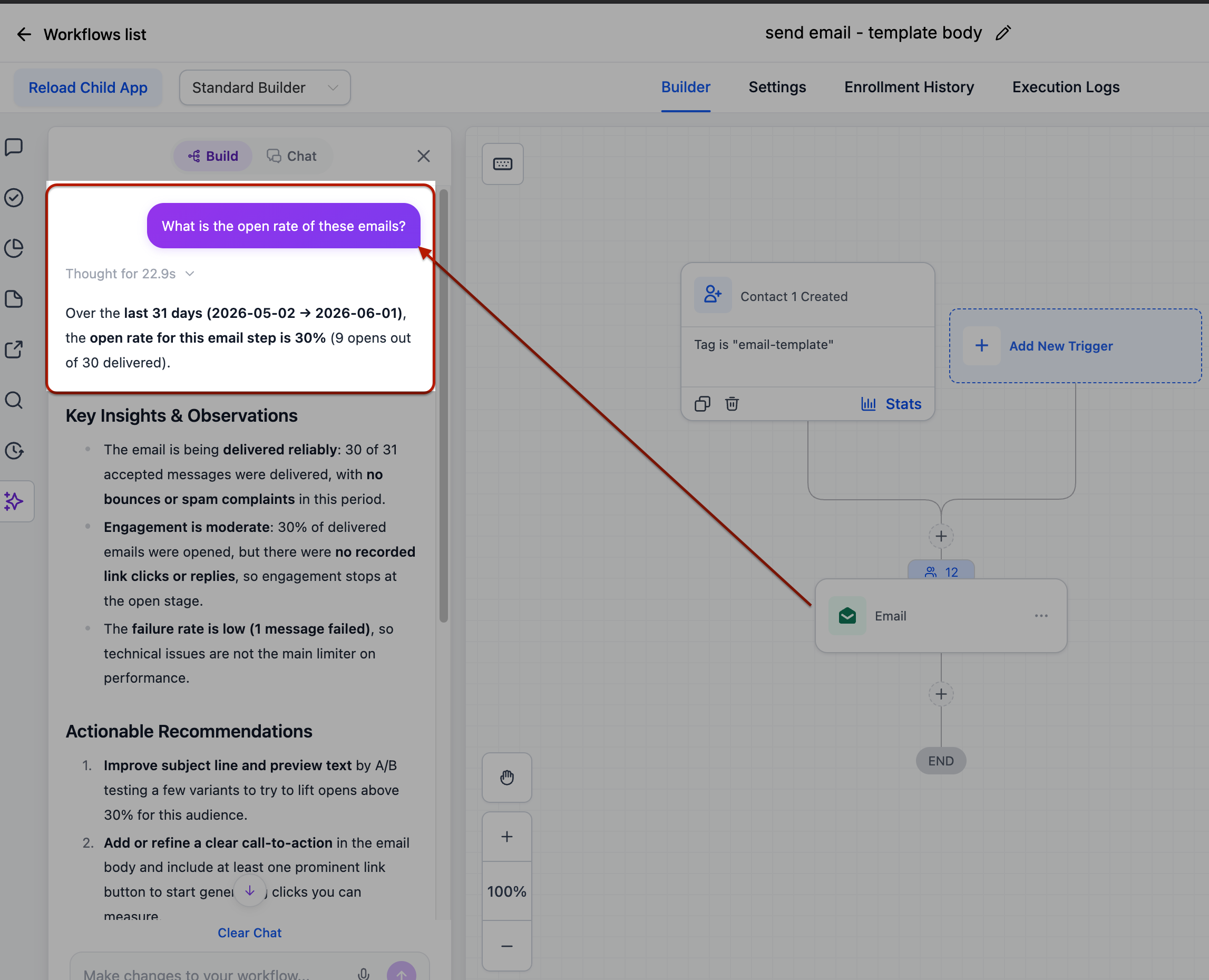
Understanding communication performance is critical for optimizing workflows.
With this update, you can now pull detailed metrics for any email or SMS step.
Available Metrics
Delivered
Opened
Clicked
Replied
Bounced
Unsubscribed
Opted out
Why It Matters
This allows you to:
Measure engagement at a granular level
Identify underperforming messages
Optimize content and timing
Instead of guessing what works, you now have clear data to guide decisions.
Branch and Path Insights: Optimize Decision Points
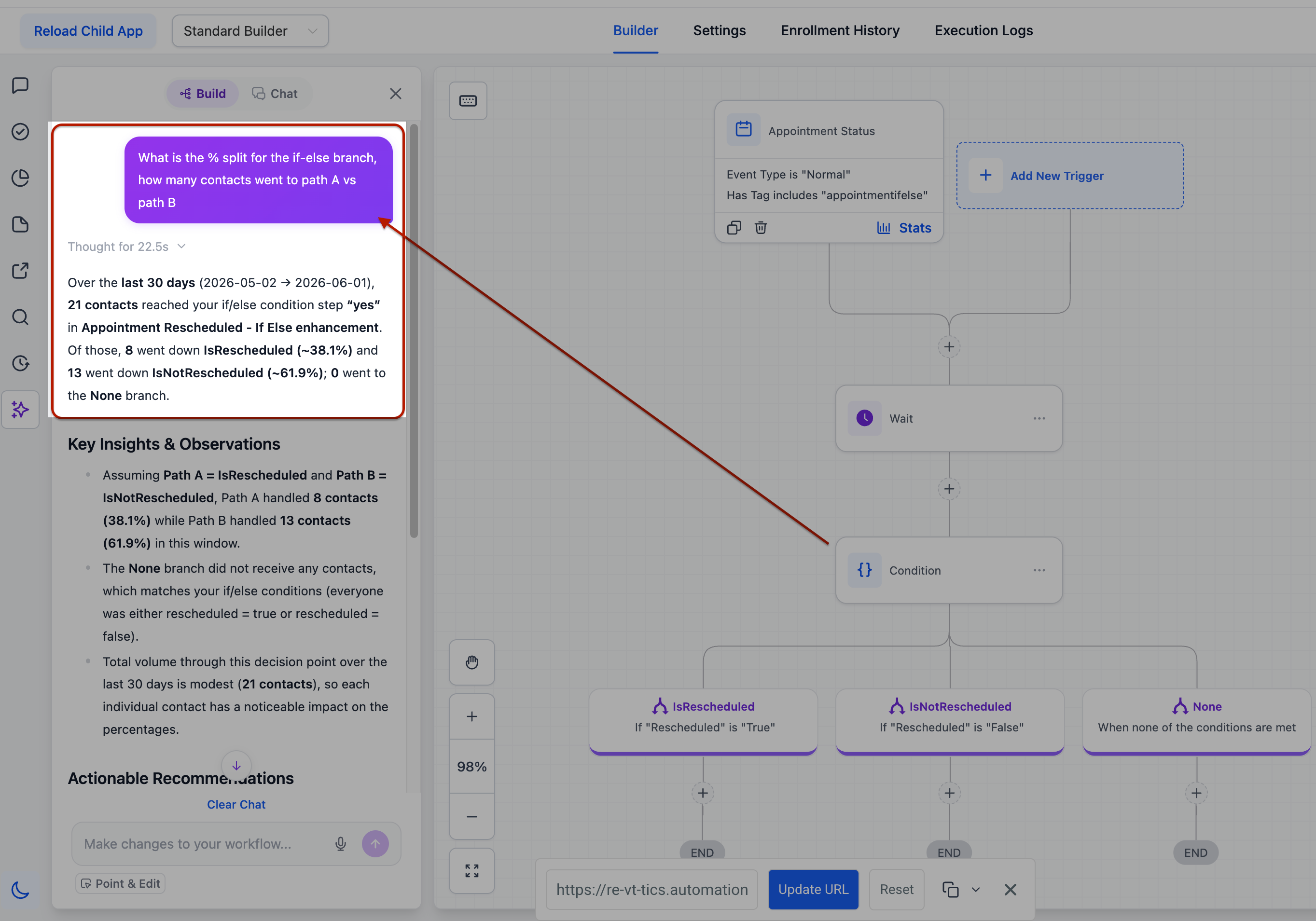
Workflows often include if/else conditions and split paths.
These are critical decision points, but until now, it was difficult to analyze how contacts move through them.
What You Can Do Now
You can see:
Percentage of contacts taking each branch
Distribution across different paths
Real Impact
This helps you:
Identify imbalances in logic
Optimize segmentation rules
Improve workflow efficiency
For example, if most contacts are going down one path, it may indicate that your conditions need adjustment.
Contact Tracking: Put Names Behind the Numbers
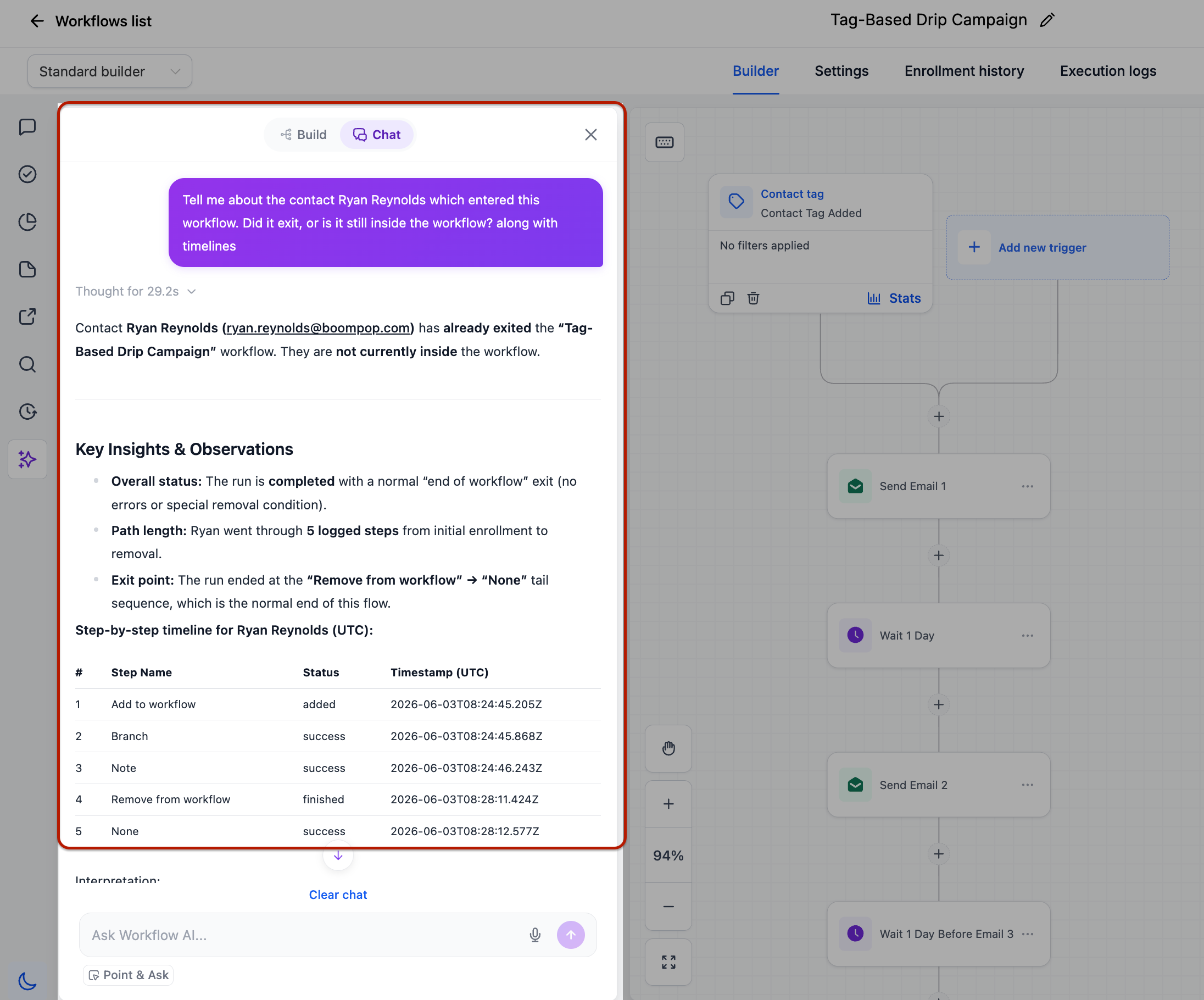
Analytics often focus on numbers, but sometimes you need to see the actual contacts.
With this feature, you can now track individual users within workflows.
What You Can Check
Whether a contact completed, failed, or is still active
When they entered the workflow
How long they took to move through it
Their current position
Ask Direct Questions
You can also ask:
“Who entered last week?”
“Which contacts failed at the SMS step?”
The system will return names and email addresses, giving you actionable insights.
Why This Matters
This bridges the gap between analytics and real users.
You can:
Investigate issues more effectively
Follow up with specific contacts
Personalize interventions
Trigger Diagnostics: Identify Hidden Issues
Triggers are the starting point of every workflow, but diagnosing trigger issues has always been challenging.
What You Can Analyze
Whether a trigger is firing
Percentage of successful trigger executions
Reasons for rejection
Deep Inspection
You can inspect individual trigger events to:
Compare expected vs actual values
Identify mismatches
Detect silent failures
Benefit
This helps you uncover issues that previously went unnoticed, improving workflow reliability.
Workflow Discovery: Find Anything Instantly
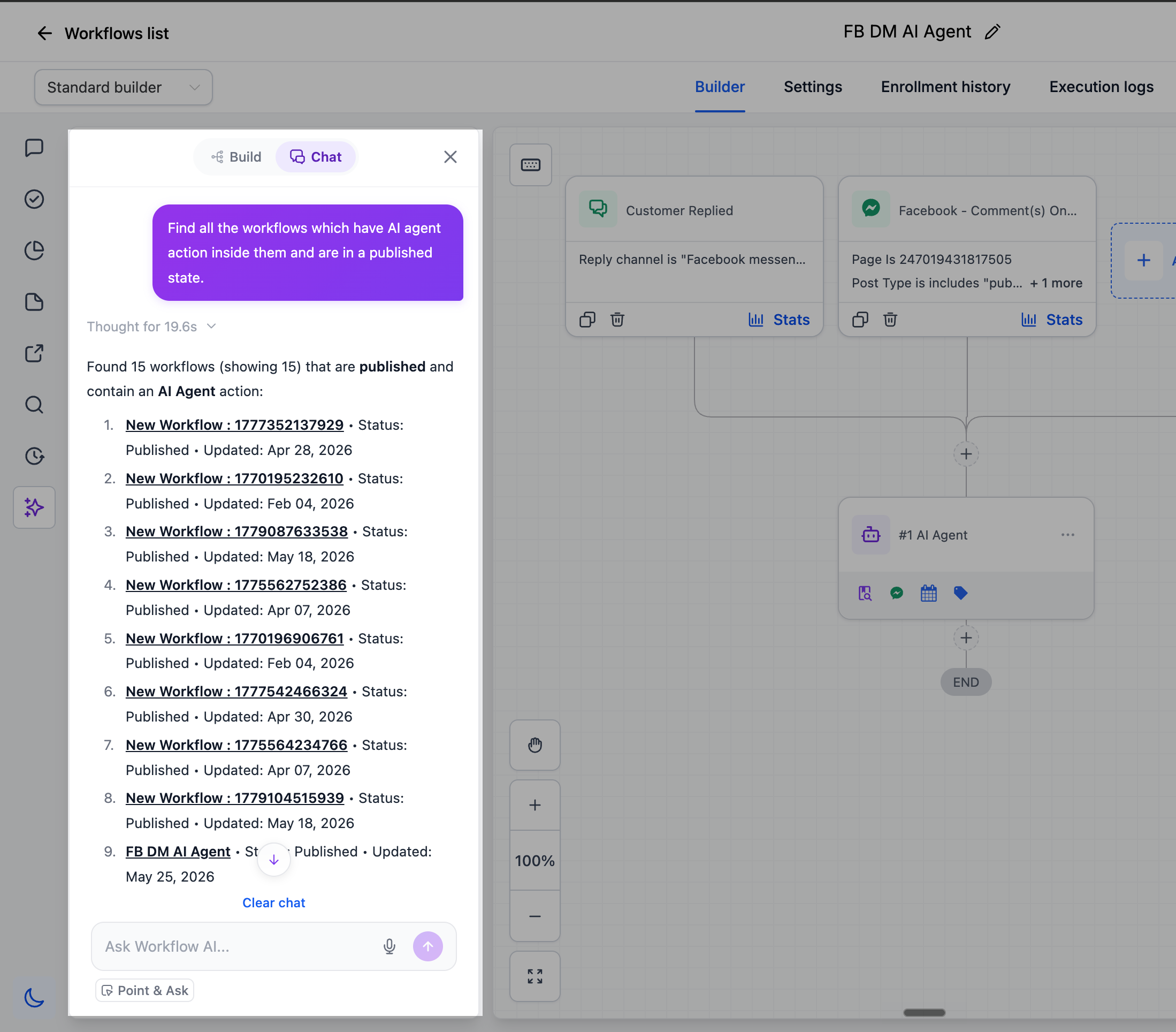
Managing multiple workflows can quickly become overwhelming.
The new discovery capability allows you to search across all workflows instantly.
Search Capabilities
You can search by:
Workflow name
Status
Tags
Triggers or actions used
Last edited user
Example Queries
“Which workflows use a Wait step?”
“Which workflows use the Invoice Paid tag?”
Outcome
Instead of manually browsing, you get immediate answers, saving time and improving productivity.
Version History: Track Changes Easily
You can now ask:
Who last edited a workflow
How many versions exist
This adds transparency and helps teams collaborate more effectively.
Built for Trust and Accuracy
The Analytics and Discovery Subagent is designed with reliability in mind.
Key Principles
Read-only access: It never modifies workflows
Accurate data: It uses live account data only
No assumptions: If data is missing, it tells you
Timezone awareness: Periods like “last 7 days” match your timezone
Structured Responses
Every answer includes:
Key metrics upfront
Comparison with previous periods
Suggested next steps
This ensures clarity and actionability.
Why This Update Matters
This feature closes a major gap between building workflows and understanding their performance.
Before
Manual log analysis
Multiple dashboards
Limited visibility
Time-consuming investigation
Now
Instant answers in plain language
Real-time insights
Centralized workflow management
Faster decision-making
Key Benefits
Saves time on analysis
Improves workflow performance
Enhances decision-making
Reduces dependency on technical expertise
The Bigger Picture
This update represents a shift toward intelligent workflow management.
Instead of:
Building workflows blindly
Analyzing data separately
You now have a unified system where:
Build + Analyze + Discover = One Experience
