API Versioning in Public Docs: Build Stable & Future-Proof Integrations
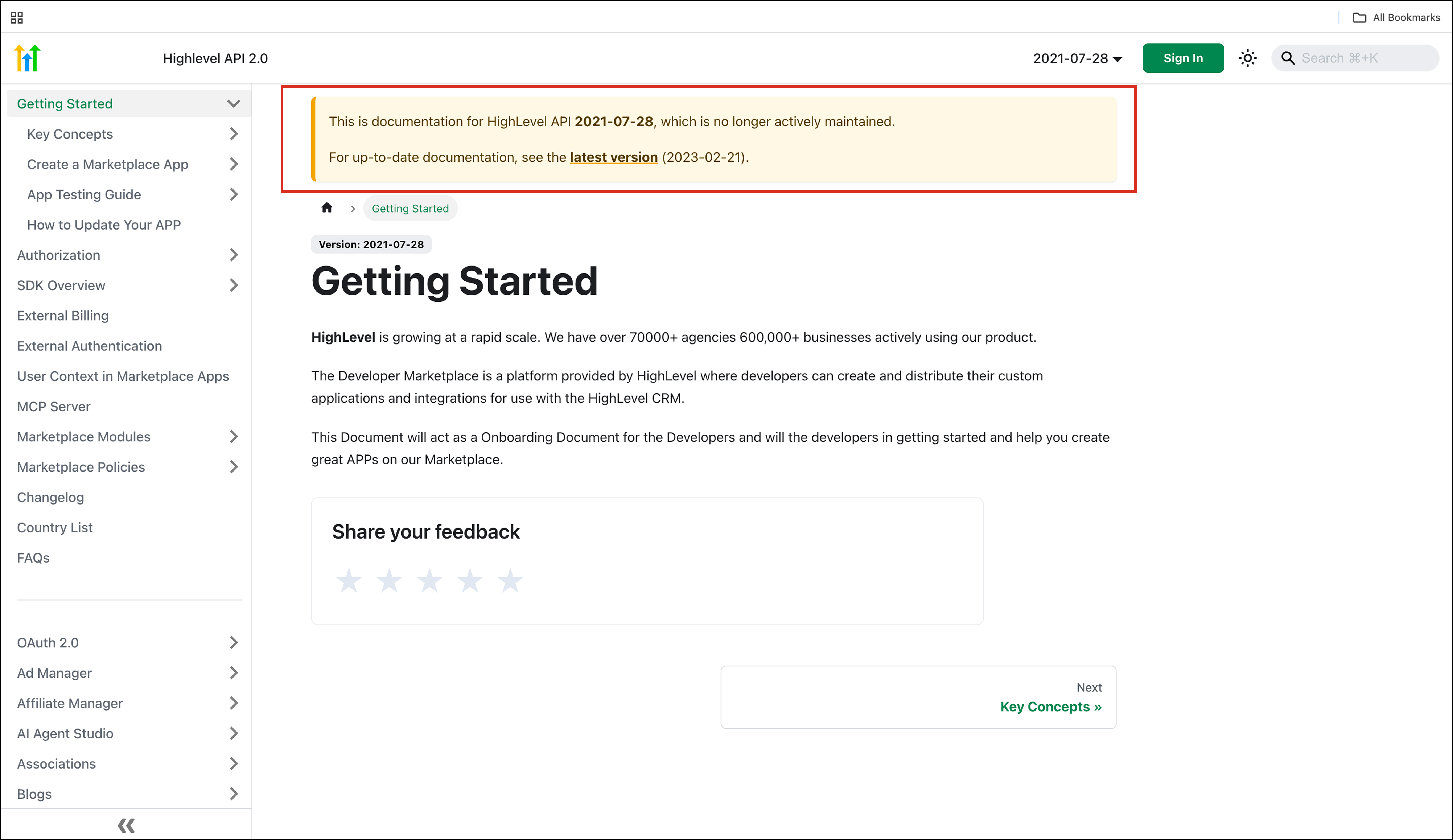
In today’s development landscape, APIs play a critical role in connecting systems, enabling automation, and powering modern applications. However, one of the biggest challenges developers face is maintaining stability when APIs evolve.
Even small changes in API structure can lead to unexpected issues in production systems, especially for teams managing long-term integrations.
To address this, a significant update has been introduced:
API Versioning Support for Public Documentation
This enhancement brings structured versioning into public API documentation, allowing developers to work confidently with specific API versions while ensuring long-term stability.
What Is API Versioning in Documentation?
API versioning is the practice of maintaining multiple versions of an API so that changes can be introduced without disrupting existing integrations.
With this update, public API documentation is now version-aware. Each version of the API has its own dedicated documentation, making it easier for developers to reference the exact version they are working with.
This eliminates confusion and reduces the risk of errors caused by undocumented or unexpected changes.
What’s New in This Update
This release introduces several key capabilities that improve how developers interact with API documentation.
Versioned API Documentation
Each API version now has its own dedicated documentation.
This means developers can:
Access version-specific endpoints
Review accurate request and response formats
Understand changes between versions
Instead of relying on a single evolving document, users now have a clear reference point for each version.
Version Switcher
A built-in version switcher allows developers to easily toggle between different API versions directly within the documentation.
This feature makes it simple to:
Compare versions
Explore updates
Test different implementations
It also helps teams transition between versions more smoothly.
Backward Compatibility
Older API versions remain accessible and fully documented.
This ensures that:
Existing integrations continue to work
Developers can maintain legacy systems
No sudden breaking changes impact production environments
Backward compatibility is essential for businesses that rely on stable systems over long periods.
Why This Update Matters
This enhancement addresses one of the most critical concerns in API development — unpredictability caused by changes.
1. Predictable and Stable Integrations
With versioned documentation, developers can work with confidence, knowing that:
Their API version will not change unexpectedly
Documentation will remain consistent
Integrations will remain stable
This is especially important for production environments where downtime or errors can have significant consequences.
2. Smoother Upgrade Paths
As APIs evolve, developers often need to upgrade to newer versions.
Without versioning, this process can be complex and risky.
With this update:
Developers can review changes before upgrading
Test new versions without disrupting existing systems
Transition gradually instead of making sudden changes
This creates a safer and more controlled upgrade process.
3. Improved Developer Experience
Clear, version-specific documentation significantly improves usability.
Developers no longer need to:
Guess which version they are working with
Search through outdated or mixed information
Deal with inconsistencies
Instead, they can focus on building and integrating efficiently.
4. Confidence for Long-Running Systems
Many businesses rely on integrations that run for months or even years without interruption.
This update ensures that:
These systems remain stable
Changes do not break existing functionality
Developers can maintain systems without constant rework
Key Highlights of the Update
This release brings several important advantages that improve both development and operations.
No Impact on Existing Integrations
One of the most important aspects of this update is that it does not affect current systems.
Existing integrations will:
Continue to function as before
Not require immediate updates
Remain stable and reliable
This ensures a seamless transition.
Simplified API Adoption
For new developers, versioned documentation makes it easier to get started.
They can:
Choose a specific API version
Follow clear documentation
Build integrations without confusion
Foundation for Future API Evolution
Versioning creates a structured framework for introducing future changes.
This allows:
Controlled updates
Planned deprecations
Better communication with developers
Enhanced Transparency
Developers now have full visibility into:
Available API versions
Changes between versions
Version-specific features
This transparency builds trust and improves collaboration between platform providers and developers.
Impact on Developers and Businesses
The introduction of API versioning has a direct impact on how teams build and maintain integrations.
Improved Reliability
Systems become more reliable because they are no longer affected by unexpected API changes.
Reduced Risk of Failures
By working with fixed versions, developers can avoid issues caused by:
Breaking changes
Updated endpoints
Modified data structures
Faster Development and Debugging
Clear documentation helps developers:
Build integrations faster
Identify issues quickly
Debug more efficiently
Stronger Developer Ecosystem
A structured and transparent API environment encourages more developers to build on the platform.
This leads to:
More integrations
Better tools
A stronger ecosystem overall
How to Use API Versioning in Documentation
Using the new versioning system is straightforward.
Step-by-Step Process
Open the API documentation
Use the version switcher to select your desired API version
Review endpoints, schemas, and parameters for that version
Build or update your integration based on the selected version
Best Practices
To make the most of this feature:
Always confirm the API version before building
Test new versions in a staging environment
Gradually migrate to newer versions when ready
Real-World Use Cases
This update is valuable across various scenarios.
SaaS Integrations
Developers building SaaS integrations can ensure long-term stability for their applications.
Enterprise Systems
Large organizations can maintain legacy integrations while exploring new features safely.
Agencies and Developers
Teams managing multiple clients can standardize integrations using specific API versions.
