GoHighLevel White-Label Desktop App Guide
White-Label Desktop App: Build and Launch Your Own Branded Software Experience
As agencies continue to evolve, one thing is becoming increasingly clear — branding and user experience are no longer optional. Clients don’t just want results; they want a seamless, professional, and fully branded experience when interacting with your tools.
To support this shift, GoHighLevel has introduced a powerful new feature:
White-Label Desktop App
Agencies can now build, customize, and distribute their own fully branded desktop applications, delivering a faster, smoother, and more immersive experience to their clients.
Available across macOS, Windows, and Linux, this feature allows agencies to extend their brand beyond web interfaces and into a dedicated desktop environment.
What Is the White-Label Desktop App?
The White-Label Desktop App is a fully customizable desktop version of your platform, branded entirely as your own.
Instead of clients logging into a browser-based system, they can now access your services through a dedicated application that:
Reflects your brand identity
Provides a faster and more responsive experience
Enhances usability with smoother workflows
This transforms your offering from a tool into a complete branded software product.
Why Desktop Apps Matter for Agencies
While web apps are convenient, desktop applications offer several advantages that significantly improve user experience.
Faster Performance
Desktop apps typically load faster and respond more efficiently than browser-based tools.
This leads to:
Reduced lag
Faster navigation
Better productivity for end users
Improved Workflow Experience
With a dedicated application, users can:
Focus on tasks without browser distractions
Navigate seamlessly between features
Experience smoother transitions and interactions
Stronger Brand Perception
When clients use a desktop app with your branding, it reinforces your authority.
Instead of using a third-party platform, they feel like they are using your software.
This strengthens:
Brand trust
Client loyalty
Perceived value of your services
Introducing the Desktop App Customizer
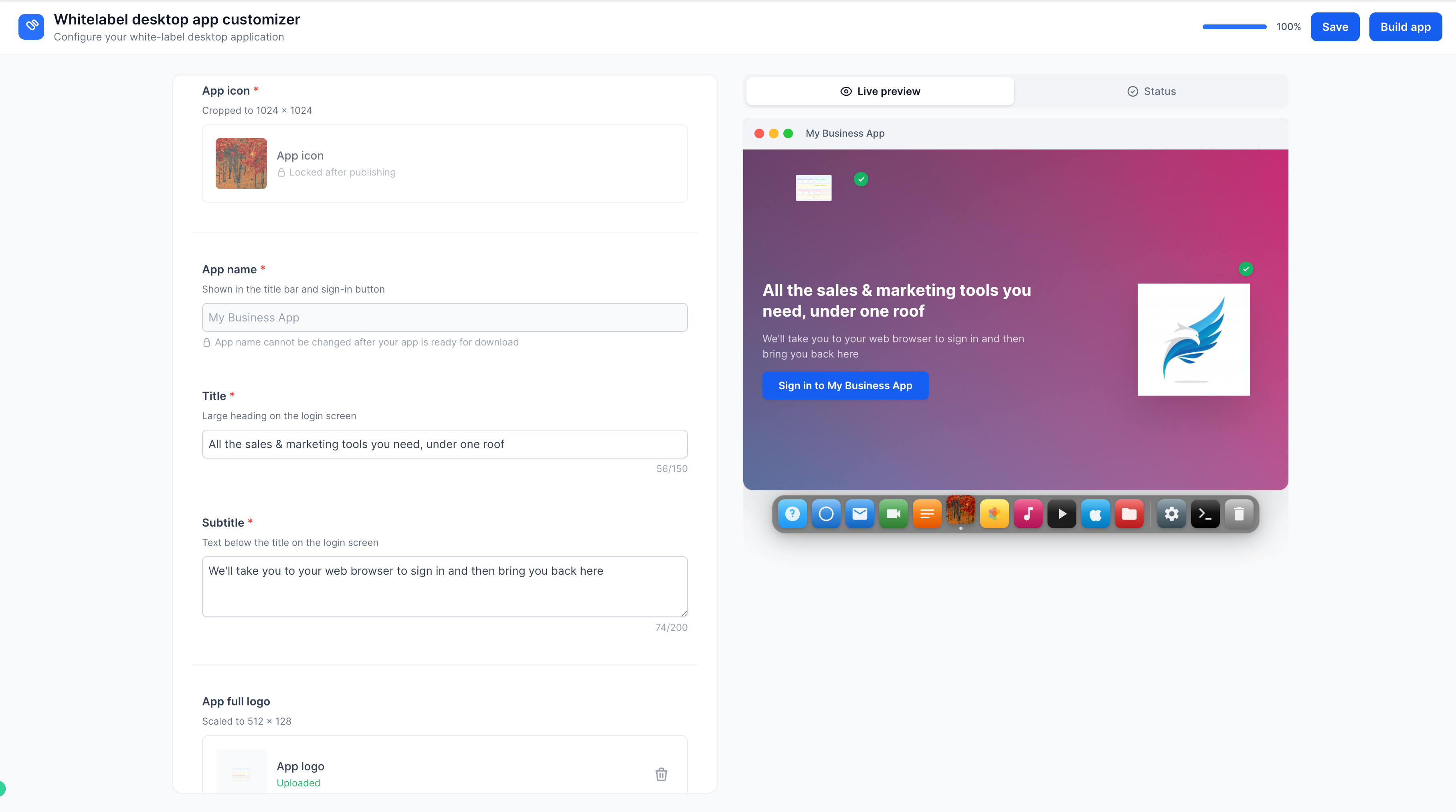
To make this possible, GoHighLevel has introduced the Desktop App Customizer, located inside the Agency Launchpad.
This tool gives agencies complete control over how their desktop application looks and feels.
Customization Options
The Desktop App Customizer allows you to tailor every visual aspect of your app.
Theme Customization
You can choose from preset themes or create your own.
This allows you to match your app with:
Brand colors
Visual identity
Client preferences
A consistent theme ensures that the app aligns perfectly with your brand.
App Icon
Your app icon is one of the most important branding elements.
You can now set a custom icon that:
Represents your business
Appears on desktops and taskbars
Reinforces brand recognition
App Name
Define how your application appears to users.
This is especially useful for agencies offering white-labeled services, as you can present the app as your own product.
For example:
Instead of a generic name, clients see your agency’s name every time they open the app.
Background Image
You can upload a custom background image to personalize the app interface.
This allows you to:
Create a visually engaging experience
Highlight brand aesthetics
Add a professional touch
Placeholder Images
Additional placeholder images can be added to enhance the overall look and feel of the application.
These visuals help create a polished and modern interface that aligns with your brand.
Real-Time Live Preview
One of the most useful features of the Desktop App Customizer is the live preview functionality.
As you make changes, the system updates instantly.
This means:
You can see exactly how your app will look
No guesswork is involved
Adjustments can be made quickly
This ensures that the final product matches your expectations before launching.
Building and Distributing Your App
Once your customization is complete, the next step is building your application.
One-Click App Build
With the Build App action, the platform automatically generates your desktop application.
This process includes:
Compiling your customized design
Preparing platform-specific builds
Generating download links
Multi-Platform Support
Your app is available across:
macOS
Windows
Linux
This ensures that your clients can access your platform regardless of their operating system.
Easy Distribution
Once the build is complete, you can:
Download the application
Share access links with clients
This makes it simple to onboard users and provide them with immediate access to your branded platform.
How to Get Started
Setting up your White-Label Desktop App is straightforward.
Step-by-Step Process
Navigate to your Agency Dashboard
Open the Desktop App tab
Configure your customizations
Save your settings
Trigger the Build App process
Download or share your app
Within minutes, your branded desktop application is ready for use.
Benefits for Agencies
This feature offers several strategic advantages for agencies looking to scale and differentiate themselves.
Full Brand Ownership
You are no longer just providing access to a platform.
You are delivering your own software product.
This strengthens your brand identity and positions your agency as a technology provider.
Enhanced Client Experience
Clients benefit from:
Faster performance
Better usability
A more professional interface
This improves overall satisfaction and engagement.
Increased Retention
When clients rely on your branded app for daily operations, they become more integrated into your ecosystem.
This makes them less likely to switch to competitors.
Competitive Advantage
Most agencies still rely on generic tools.
By offering a custom desktop application, you stand out in the market.
This can be a key differentiator when acquiring new clients.
Scalable Delivery Model
As your agency grows, distributing a standardized desktop app becomes easier than managing multiple web-based setups.
This supports long-term scalability.
Practical Use Cases
The White-Label Desktop App is valuable across various business models.
Marketing Agencies
Provide clients with a branded dashboard for managing campaigns, leads, and automation.
Coaching Businesses
Offer clients a dedicated platform for accessing training, resources, and communication.
SaaS Resellers
Transform your offering into a fully branded software product.
Service-Based Businesses
Create a centralized hub for client interactions, bookings, and communication.
