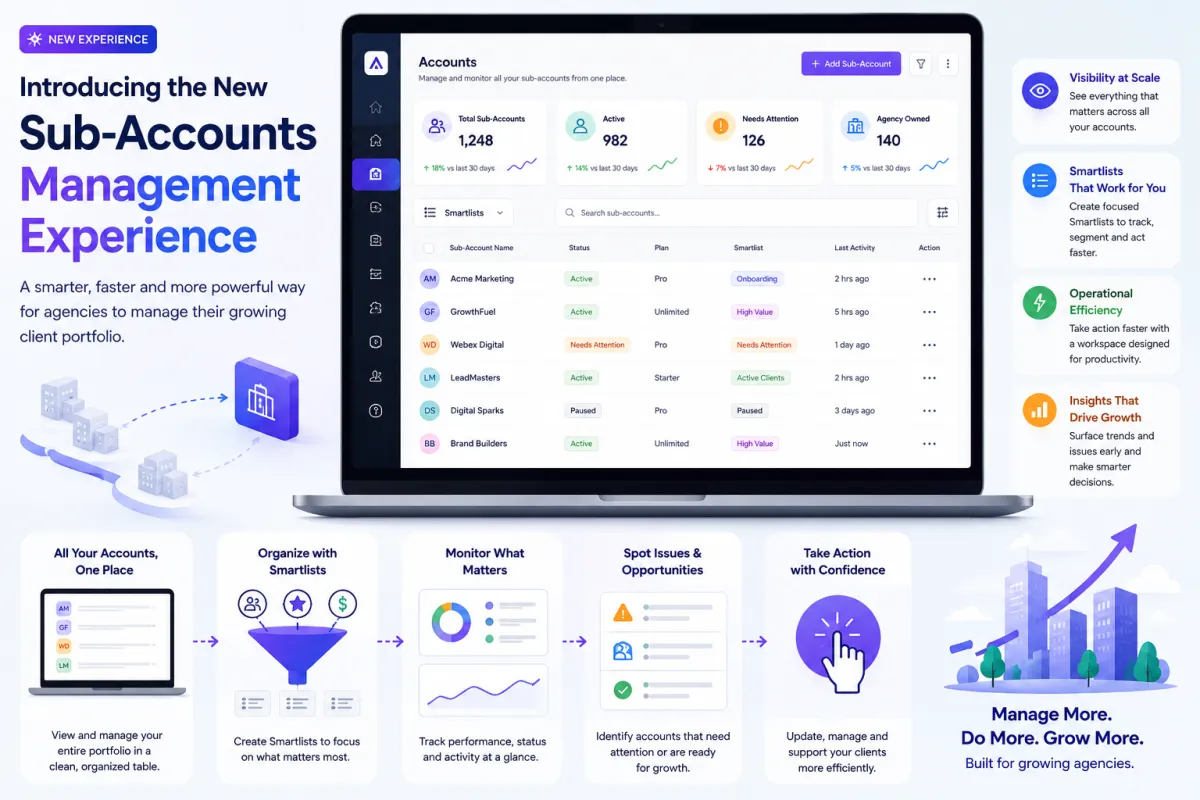
Introducing the New Sub-Accounts Management Experience
Managing Sub-Accounts has always been at the core of running a successful agency. But as agencies grow, the complexity of handling multiple clients, tracking performance, and maintaining operational efficiency increases significantly. What works for 10 accounts simply doesn’t scale to 100 or 1,000.
That’s why this new Sub-Accounts Management Experience is more than just a redesign. It’s a complete shift in how Agency Owners interact with their client portfolios—bringing clarity, speed, and control into a single, powerful workspace.
A Modern Approach to Sub-Account Management
At the heart of this update is the new Accounts tab, which now serves as the primary hub for managing all Sub-Accounts.
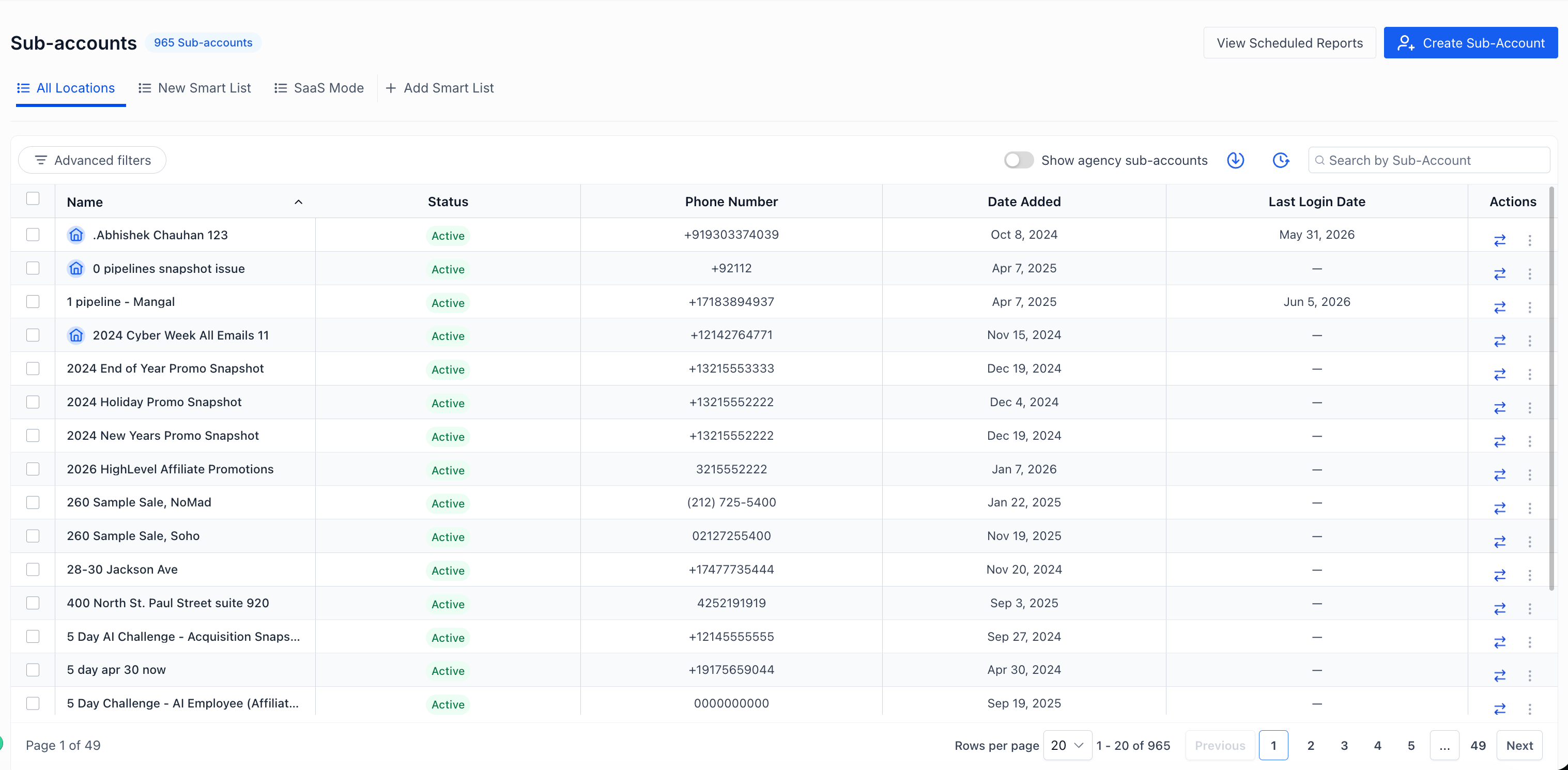
Inspired by the HighRise experience, the traditional card-based layout has been replaced with a structured, tabular interface. This change is not just visual—it fundamentally improves how information is consumed and acted upon.
Instead of scrolling endlessly through individual account cards, Agency Owners can now:
View all Sub-Accounts in a single, organized table
Compare key information across accounts instantly
Focus on relevant data without unnecessary clutter
Navigate large portfolios with ease
This shift transforms Sub-Account management from a passive viewing experience into an active operational workspace.
Built for Agencies That Are Scaling Fast
As agencies grow, one of the biggest challenges is visibility. Finding the right account, at the right time, with the right context becomes increasingly difficult.
The new experience addresses this by making data more accessible and actionable.
With the redesigned interface, Agency Owners can:
Quickly identify accounts that need attention
Surface operational issues before they become problems
Monitor performance across multiple clients at once
Organize accounts based on business priorities
This means less time spent searching and more time making decisions.
For agencies managing hundreds of Sub-Accounts, this improvement alone can significantly reduce operational friction.
Smartlists: The Core of the New Experience
One of the most powerful additions in this update is the introduction of Smartlists as the central organizing system.
Smartlists allow Agency Owners to create customized views of their Sub-Accounts based on specific filters, conditions, or business needs.
Instead of repeatedly applying filters or running searches, you can now:
Create dedicated views for onboarding clients
Track high-value or priority accounts
Monitor accounts with issues or incomplete setups
Segment accounts by team, niche, or lifecycle stage
This creates a workflow where your most important data is always one click away.
Smartlists essentially turn your Sub-Account list into a dynamic control panel tailored to how your agency operates.
A More Efficient Way to Work
Efficiency is not just about speed—it’s about reducing unnecessary steps.
The new Sub-Accounts experience has been designed to eliminate common bottlenecks and make daily operations smoother.
Now, Agency Owners can:
Review account data without switching between pages
Perform actions directly from the list view
Maintain focus without navigating multiple layers
Work faster with fewer clicks and less friction
Whether you're onboarding new clients, reviewing account health, or managing ongoing operations, everything is now centralized.
This unified workspace ensures that teams can move quickly without losing context.
Better Visibility, Better Decisions
Data is only useful if it’s easy to understand and act upon.
The redesigned interface enhances visibility by presenting information in a structured and comparable format. This makes it easier to spot patterns, identify trends, and take proactive action.
For example:
You can quickly see which accounts are underperforming
Identify clients who may need additional support
Track onboarding progress across multiple accounts
Compare performance across different segments
This level of visibility empowers Agency Owners to make smarter, data-driven decisions.
Designed for Teams, Not Just Individuals
As agencies grow, Sub-Account management is no longer handled by a single person. It becomes a team effort involving onboarding specialists, account managers, and support teams.
The new experience supports this shift by creating a more collaborative environment.
With clearer structure and better organization:
Teams can align around shared views
Responsibilities can be segmented more effectively
Workflows become more predictable and scalable
This reduces confusion and ensures that everyone is working with the same information.
Why This Update Matters
This release is not just about improving usability—it’s about enabling growth.
As agencies scale, the systems they rely on must evolve. The old way of managing Sub-Accounts simply wasn’t designed for large-scale operations.
This new experience solves that by providing:
Scalability: Manage hundreds or thousands of accounts without complexity
Speed: Find and act on information faster
Clarity: Understand your portfolio at a glance
Control: Organize accounts in a way that fits your workflow
It turns Sub-Account management into a strategic advantage rather than an operational burden.
A Foundation for the Future
Perhaps the most important aspect of this update is what it enables going forward.
By moving to a structured, Smartlist-driven, tabular interface, the platform now has a solid foundation to support future enhancements such as:
Advanced filtering and segmentation
Deeper analytics and reporting
Automation workflows tied to account states
More granular access and permissions
This is not just a one-time improvement—it’s the beginning of a more scalable and intelligent system.
