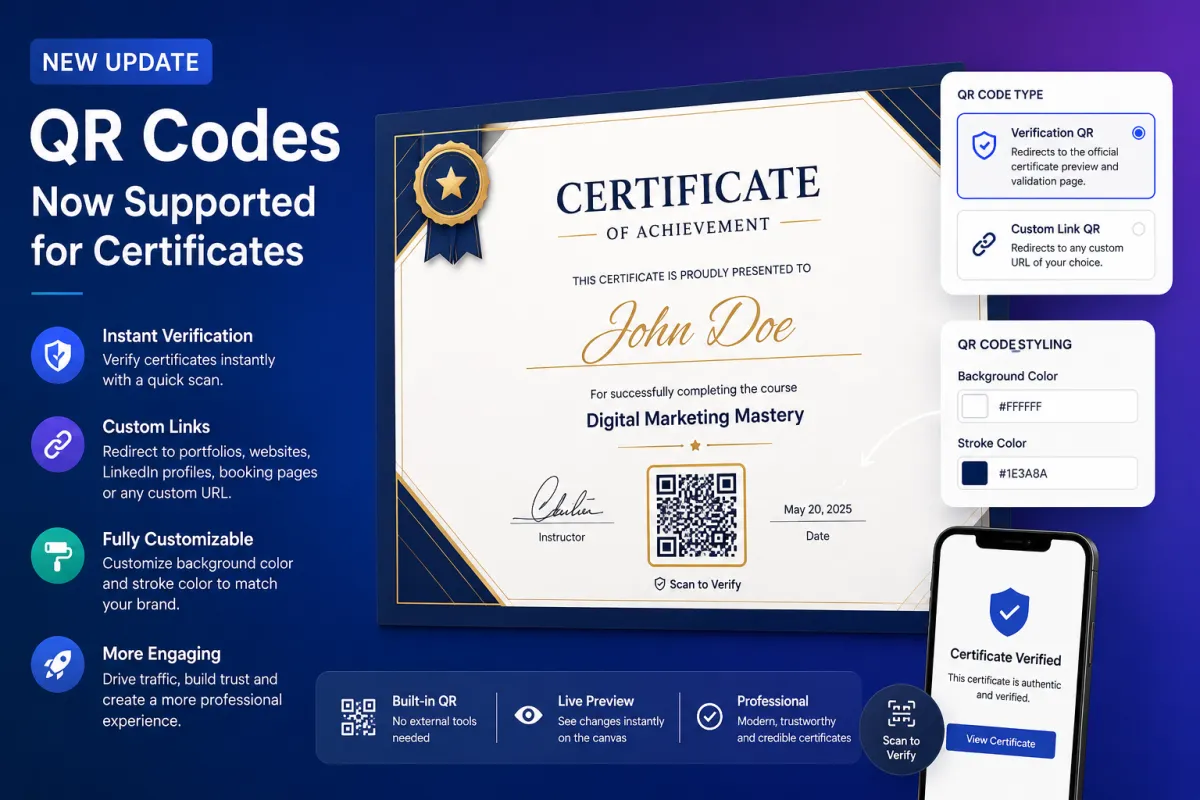
QR Codes for Certificates: Make Credentials Verifiable and Interactive
Certificates have long been used to validate achievements, showcase skills, and build credibility. Whether issued by training institutes, agencies, or organizations, certificates play a critical role in establishing trust.
However, traditional certificates come with limitations. Verifying authenticity often requires manual checks, and there is no easy way to connect a certificate to additional information such as portfolios, profiles, or proof of work.
That changes with the latest update:
QR Codes Now Supported for Certificates
With this new feature, you can now add QR codes directly inside your certificates — making them instantly verifiable, more interactive, and significantly more professional.
What This Update Brings
This update introduces native QR code functionality within the Certificate Builder.
Instead of relying on external tools or manual uploads, everything is now handled directly within the platform.
You can generate, customize, and embed QR codes seamlessly as part of your certificate design.
This removes friction and opens up new possibilities for how certificates are used and shared.
QR Code Support Inside Certificate Builder
The biggest addition is the ability to add QR codes directly within your certificates.
This feature is built into the Certificate Builder, meaning:
No third-party QR generators are needed
No manual image uploads are required
Everything is managed within a single workflow
This simplifies the entire process and ensures consistency across all certificates.
Two Types of QR Codes You Can Use
The system supports two powerful types of QR codes, each serving a different purpose.
1. Verification QR Code
The verification QR is designed to ensure authenticity.
When scanned, it redirects users to:
The official certificate preview
A validation page confirming its legitimacy
Why It Matters
This makes certificates:
Instantly verifiable
More trustworthy
Harder to fake or misuse
For employers, clients, or external stakeholders, this eliminates the need for manual verification.
A simple scan is enough to confirm authenticity.
2. Custom Link QR Code
The custom QR code allows you to link the certificate to any external resource.
This could include:
Portfolio pages
Personal websites
LinkedIn profiles
Booking pages
Project showcases
Why This Is Powerful
Certificates are no longer just static documents.
They become interactive gateways that connect to deeper information about the individual or organization.
This adds significant value to both the issuer and the recipient.
QR Code Styling and Customization
Design plays an important role in how certificates are perceived.
To ensure QR codes match your branding, the platform offers built-in styling options.
Customization Features
You can customize:
Background color
Stroke color
Live Preview
As you make changes, the QR code updates in real time within the builder.
This allows you to:
Align the design with your certificate theme
Ensure visual consistency
Create a professional final output
Why This Update Matters
This feature goes beyond convenience. It addresses key challenges in certificate usage and enhances their overall impact.
1. Instant Verification
One of the biggest issues with certificates is verifying authenticity.
With QR codes:
Verification becomes instant
No manual checks are required
Trust is built immediately
This is especially important for:
Employers reviewing candidates
Clients validating credentials
Organizations maintaining credibility
2. Increased Professionalism
Certificates with QR codes look more modern and credible.
They signal that:
The issuer uses advanced tools
The credential is authentic
The process is structured and reliable
This enhances brand perception.
3. Better Engagement and Interaction
Traditional certificates are static.
QR-enabled certificates are interactive.
Users can:
Scan and explore additional information
Access related content instantly
Engage beyond the document itself
4. Traffic and Lead Generation Opportunities
Custom QR codes open up marketing possibilities.
You can direct users to:
Landing pages
Booking forms
Portfolio showcases
This turns certificates into a traffic-driving asset.
5. Flexibility Without External Tools
Previously, adding QR codes required:
External generators
Downloading images
Uploading manually
Now, everything is built-in.
This reduces:
Time spent
Complexity
Risk of errors
Practical Use Cases
This feature is valuable across multiple industries and use cases.
Training and Certification Programs
Institutes can issue certificates that:
Verify authenticity instantly
Link to course details or achievements
Agencies and Service Providers
Agencies can:
Add booking links
Showcase client work
Build credibility
Freelancers and Professionals
Individuals can use QR codes to:
Link to portfolios
Share LinkedIn profiles
Highlight projects
Corporate Teams
Organizations can:
Verify internal certifications
Track training completion
Improve documentation processes
How It Improves the Certificate Experience
This update transforms certificates in three key ways:
From Static to Dynamic
Certificates are no longer just documents.
They become interactive tools.
From Trust-Based to Verified
Instead of trusting a certificate, users can verify it instantly.
From Passive to Engaging
Certificates now create opportunities for further interaction and engagement.
