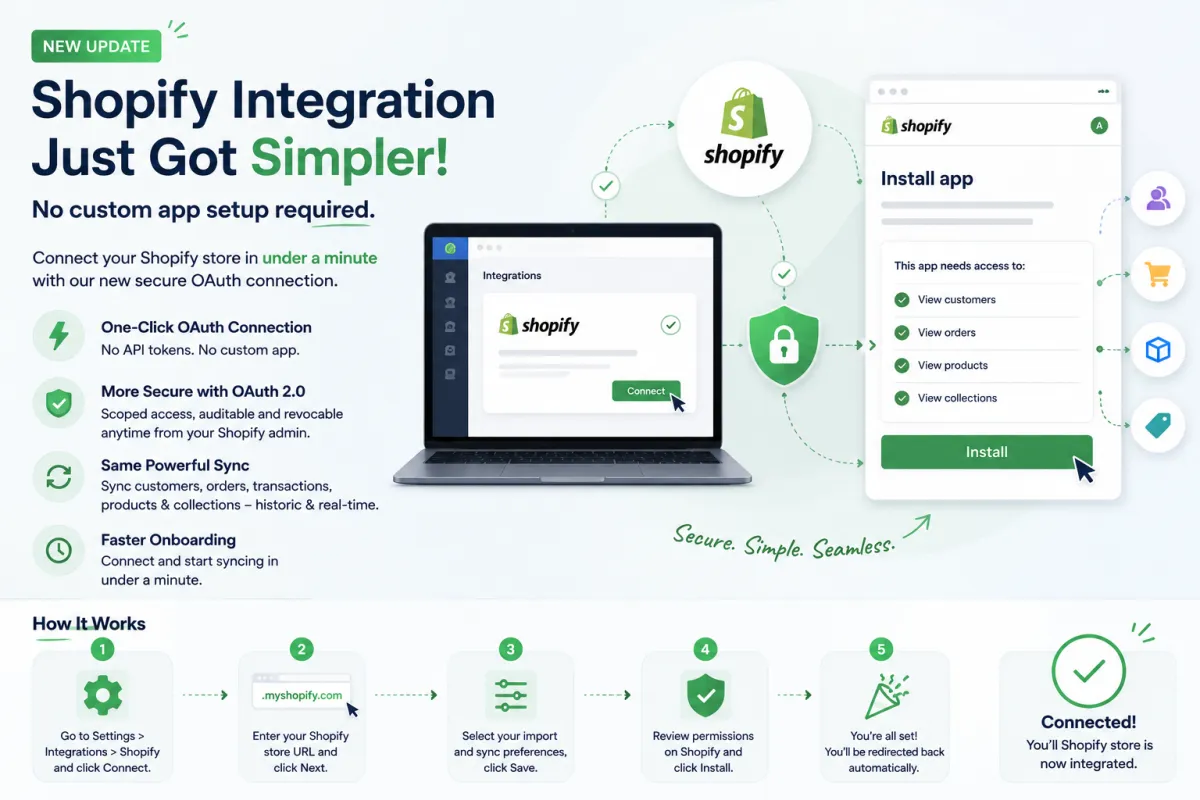
Shopify OAuth Integration: Connect Your Store Without API Keys or Custom Apps
Integrating your Shopify store with your marketing and CRM tools has traditionally been one of those tasks that felt more technical than it should. From generating API keys to configuring custom apps and managing permissions, the process often required developer support or at least a fair amount of technical understanding.
That changes now.
With the introduction of the new Shopify OAuth App, connecting your Shopify store has become faster, simpler, and more secure than ever before. You can now go from zero to fully integrated in under a minute, without dealing with API tokens, custom app setups, or complex configurations.
Let’s break down what this update means, how it works, and why it’s a big deal for both merchants and agencies.
The Shift Toward Simplicity
The biggest improvement in this update is the move from a manual, developer-heavy setup to a one-click OAuth-based connection.
Previously, integrating Shopify required:
Creating a custom app inside Shopify
Generating API credentials
Copying and pasting keys into your CRM or platform
Managing permissions manually
This process was not only time-consuming but also prone to errors.
Now, with OAuth 2.0 integration:
No API keys are needed
No custom app creation is required
No technical expertise is necessary
It’s a clean, guided flow that removes friction and makes Shopify integration accessible to everyone.
What’s New in This Update
1. One-Click OAuth Connection
The highlight of this update is the simplified OAuth connection.
You can now connect your Shopify store directly with just a few clicks. Instead of manually setting up integrations, the system handles authentication through Shopify’s standard authorization process.
This means:
Faster setup
Fewer errors
A smoother overall experience
2. Improved Security with OAuth 2.0
Security is a major upgrade here.
The new integration uses OAuth 2.0, which replaces long-lived API credentials with secure, permission-based access.
Key benefits include:
Access is scoped and controlled
Permissions are clearly defined
Access can be revoked anytime from Shopify admin
No sensitive API keys stored manually
This significantly reduces security risks while giving users more control over their integrations.
3. Same Powerful Sync Capabilities
While the setup process has changed, the functionality remains just as powerful.
You still get full access to:
Customer data (historic and real-time)
Orders and transactions
Products and collections
Continuous syncing between systems
In short, nothing is lost in terms of capability. You get the same robust integration, just without the complexity.
4. Faster Onboarding Experience
What used to take 15 to 30 minutes or more can now be completed in under a minute.
There’s:
No need to generate API tokens
No need to configure endpoints
No dependency on developers
This is especially useful for businesses that want to move quickly and start leveraging their Shopify data immediately.
How the New Shopify Integration Works
The process is designed to be simple and intuitive. Here’s how you can connect your Shopify store step by step:
Step 1
Go to Settings → Integrations → Shopify and click on Connect.
Step 2
Enter your Shopify store URL and click Next.
Step 3
Choose your import and sync preferences based on your needs.
Step 4
You’ll be redirected to Shopify, where you can review the requested permissions and click Install.
Step 5
Once approved, you’ll be automatically redirected back, and your integration will be live.
That’s it. No extra steps, no technical barriers.
What About Existing Integrations?
If you’re already using the older custom app method, there’s no need to worry.
Your existing integration continues to work as-is
No migration is required
No changes are needed on your end
This update is designed to improve the experience for new integrations while maintaining stability for existing users.
Why This Update Matters
1. Lower Barrier for Merchants
One of the biggest challenges for Shopify store owners has been technical setup.
With this update:
Non-technical users can integrate their store easily
No need to understand API scopes or app creation
Faster time to value
This makes powerful integrations accessible to a much wider audience.
2. Agency-Grade Efficiency
For agencies managing multiple Shopify clients, this is a game-changer.
Instead of repeating the same technical setup process for every client, you can now:
Connect stores quickly
Reduce onboarding time
Eliminate dependency on developers
This leads to faster client setup and better operational efficiency.
3. Standard Shopify Authorization Flow
The integration now follows Shopify’s standard OAuth authorization flow, which is:
Familiar to users
Trusted and secure
Fully compliant with Shopify’s ecosystem
This removes the need for third-party token handling and ensures a consistent user experience.
4. Reduced Errors and Support Issues
Manual setups often lead to:
Incorrect API configurations
Permission mismatches
Broken integrations
By automating the process, this update reduces the chances of errors and minimizes support issues.
Real-World Impact
This update may seem like a small technical improvement, but its impact is significant.
For a business owner:
You can connect your store instantly and start using your data right away
For an agency:
You can onboard clients faster and scale operations more efficiently
For developers:
You spend less time on repetitive setup tasks and more time building meaningful solutions
The Bigger Picture
This update reflects a broader shift in how integrations are evolving.
Modern platforms are moving toward:
Simpler user experiences
Secure, standardized authentication methods
Faster onboarding processes
The goal is clear: remove unnecessary complexity so users can focus on growth instead of setup.
